



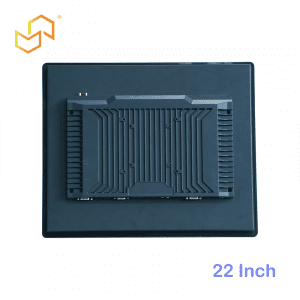
Choosing the right Panel PC size is about more than screen preference. How to Choose the Right Size? Small Panel PC vs Large Panel PC. The right display size affects visibility, cabinet fit, operator comfort, installation flexibility, and the overall feel of the system. For industrial and commercial projects, size is often one of the first decisions that shapes the rest of the design.
At LCDSLD, Panel PC size matters because different projects need different combinations of compactness and readability. A 10.4-inch unit may be perfect for a tight machine panel, while a 21.5-inch model may be better for a control station, kiosk, or dashboard-driven application.
Why Panel PC Size Matters? Small Panel PC vs Large Panel PC
Panel PC size affects how much information can be shown clearly on the screen. It also influences how easy the device is to mount, how much space it takes up, and how comfortable it is for operators to use over long periods. A small panel can save space, but it may be harder to read from a distance.
A larger panel improves readability and can make touch interaction easier, especially when multiple data fields or controls must be visible at once. The trade-off is that larger units require more wall, cabinet, or machine front space. That is why size selection should always start with the application, not the catalogue listing.
Common Sizes Explained
Panel PCs are commonly available in sizes such as 10.4, 15, 15.6, 19, 21.5, and 22 inches. Each size has a different balance of compactness and usability. Rather than treating them as competing products, it is better to think of them as tools for different installation conditions.
10.4 inch Panel PC
A 10.4-inch Panel PC is ideal when space is tight, and the interface is relatively simple. It works well in compact control panels, embedded machinery, and small operator stations where the screen does not need to display a large amount of data. Because it takes up less room, it is often a good choice for OEM machines and older cabinet layouts.
15 inch Panel PC
A 15-inch Panel PC is one of the most balanced and widely used sizes. It gives enough display area for industrial control, HMI, and kiosk workflows while still fitting into many cabinets and enclosures. For buyers who want a practical all-rounder, 15 inches is often the safest starting point.
15.6 inch Panel PC
A 15.6-inch Panel PC is common when a wider, more modern display shape is useful. It is often a smart fit for kiosk-style applications, restaurant systems, or interfaces that benefit from a little extra horizontal space. In many projects, 15.6 inches feels like a natural bridge between compact industrial and larger commercial designs.
19 inch Panel PC
A 19-inch Panel PC is useful when readability and workspace both matter. It gives operators more room for monitoring, menus, and multi-window interfaces without jumping into a very large enclosure. This size is often selected for smart manufacturing, outdoor-adjacent kiosks, and industrial terminals that need clearer visibility.
21.5 inch Panel PC
A 21.5-inch Panel PC is a strong choice for larger interfaces, dashboards, and customer-facing installations. It offers excellent visibility and is often preferred where multiple controls or data panels need to remain visible at the same time. Because it has a larger footprint, it works best when the installation space can comfortably support it.
22 inch Panel PC
A 22-inch Panel PC is similar in use to 21.5-inch models, but it may feel slightly more open and spacious depending on the bezel and design. It is a good fit for larger HMI stations, retail terminals, and modern industrial interfaces that need clear presentation. In many projects, 21.5 and 22 inches are chosen for the same class of application.
Visibility vs Space Constraints
The biggest sizing trade-off is visibility versus cabinet space. Smaller models are easier to fit into compact equipment, but they may require more scrolling or tighter operator interaction. Larger models are easier to read and use, but they demand more installation space and may cost more to integrate.
If the device is used up close by an operator, a smaller panel may be enough. If the device must show dashboards, production data, or detailed menus from a short distance, a larger screen often improves usability. The right choice depends on how the human actually interacts with the machine.
Recommended Size by Application
A good sizing decision comes from matching the screen to the job. Different industries tend to favour different ranges based on their layout and information needs.
Manufacturing and HMI
For factory automation and HMI, 10.4, 15, or 19 inches are common choices. Smaller sizes fit tightly into machine fronts, while 19-inch units give more room for process data and operator controls. If the interface is dense, larger sizes usually make the system easier to use.
Kiosks and self-service
For kiosks and self-service terminals, 15.6, 21.5, or 22 inches often work best. These sizes give a modern visual feel and enough area for menus, forms, or customer-facing content. If the application is public-facing, visibility and usability are usually more important than saving a few inches.
Compact machinery
For compact machinery and embedded equipment, 10.4 or 15 inches is often the better route. These sizes reduce footprint and are easier to integrate into narrow cabinet fronts or machine panels. When space is the limiting factor, smaller is usually smarter.
Control rooms and dashboards
For control rooms or monitoring stations, 19, 21.5, or 22 inches can be more comfortable. The larger screen area helps with visibility, especially when multiple charts, rows, or system indicators need to stay on screen. In those cases, readability becomes the main buying criterion.
How to Choose the Right Size
The easiest way to choose is to work through a simple decision path:
-
Measure the available installation space.
-
Define how far the operator will stand from the screen.
-
Count how much data or how many controls must be visible at once.
-
Decide whether the system is industrial, kiosk-style, or customer-facing.
-
Match the size to the enclosure and service plan.
If you are still unsure, 15 inches is often the best general-purpose starting point. If visibility is more important, move up to 19 or 21.5 inches. If space is very limited, 10.4 inches is usually the most practical option.
Product Paths at LCDSLD
If you are comparing sizes, the best place to start is the category page and then narrow down by specific product family. That makes it easier to compare compact and larger options side by side.
-
Explore the Panel PC product category for industrial options.
-
Explore the Android Panel PC category for kiosk and app-driven options.
-
Review the 15 Inch Industrial Panel PC as a balanced size reference.
-
Review the 32 Inch Commercial Android Kiosk if your project is moving toward a larger, customer-facing display.
For deeper reading, these two pillar articles are the best companions:
-
Panel PC: Complete Guide to Industrial All-in-One Computing.
-
Industrial Panel PC Buyer’s Guide: How to Choose the Right Model.
What Buyers Should Remember
The right Panel PC size is the one that fits the actual workflow, not just the number on the spec sheet. Smaller units save space and work well for compact machines, while larger units improve readability and make interactive systems easier to use. In most projects, the best choice comes from balancing visibility, footprint, and installation simplicity.
A practical rule is this:
-
Choose smaller sizes when space is tight and the task is simple.
-
Choose medium sizes when you need a balance of usability and footprint.
-
Choose larger sizes when readability and interaction matter most.
FAQ
Is 10.4 inch too small for a Panel PC too small?
Not if the application is simple and the installation space is limited. It is commonly used in compact machines and control panels.
Is 15 inch the most common size?
It is one of the most balanced and widely used sizes because it works in many industrial and commercial projects.
When should I choose 21.5 inch?
Choose 21.5 inches when the interface needs more space, better readability, or a more modern kiosk-style presentation.
Does bigger always mean better?
No. Bigger screens improve visibility, but they also need more space and can be harder to fit into compact enclosures.
If you are choosing between a small and a large Panel PC, start with the space available, then match the size to the operator workflow. For product support or customisation, contact LCDSLD through the contact page and request a tailored recommendation.

 English
  Arabic
  Spanish