


A digital screen kiosk is more than just a display on a stand—it is a complete interactive communication hub that combines a high‑brightness screen, touch technology, a media player, and purpose‑built software to deliver self‑service, information, and advertising in one unit. When properly planned and deployed, digital screen kiosks can transform how customers navigate spaces, discover products, and complete transactions while reducing operational costs for businesses. This is especially true in fast‑growing markets such as Southeast Asia and the Middle East, where modern malls, transport hubs, and smart cities are expanding rapidly.
Whether you operate a shopping mall in Singapore, a quick service restaurant chain in Dubai, a hospital in Bangkok, or a corporate office in Riyadh, understanding the fundamentals of digital screen kiosks will help you make better decisions and avoid costly mistakes. This guide walks you through definitions, key components, main kiosk types, common applications, benefits, and practical tips for choosing the right solution for your project.
What Is a Digital Screen Kiosk?
A digital screen kiosk is a self‑contained digital signage and interaction terminal that uses a professional display as its core interface, usually protected in a dedicated enclosure and powered by an embedded player or operating system. Unlike a simple TV or static standee, a digital screen kiosk is engineered for long‑hour operation, higher brightness, and reliable performance in public spaces, often running 12–24 hours per day.
Technically, a digital screen kiosk integrates several elements into one unit:
-
A commercial‑ or industrial‑grade display panel
-
A touch layer (for interactive kiosks) or protective glass (for non‑touch kiosks)
-
An embedded media player or PC (Android, Windows, or SoC)
-
A purpose‑built enclosure, usually metal with a glass front
-
Power distribution, cabling, and mounting structure
-
Network connectivity (Ethernet, Wi‑Fi, 4G/5G, or a mix)
This combination makes the kiosk robust enough for crowded malls, transport hubs, and outdoor plazas across Southeast Asia and the Middle East, where temperature, humidity, and foot traffic can all be demanding.
For an overview of complete kiosk solutions, see our electronic kiosk supplier guide.
Digital Screen Kiosk vs Traditional Digital Signage
Digital screen kiosks and traditional digital signage both use displays, but they serve different roles. Traditional digital signage is mostly one‑way communication, focusing on broadcasting messages—such as a video loop or static promotional image—to a broad audience. Digital screen kiosks, on the other hand, are built for interactive, task‑oriented experiences such as wayfinding, ticketing, check‑in, or self‑ordering.
Key differences include:
-
Interaction:
Digital signage typically does not respond to user input; it simply plays content on a schedule. A digital screen kiosk can be fully interactive, allowing users to tap, scroll, search, fill forms, or complete payments. This is crucial for self‑service government counters in Dubai, mall directories in Kuala Lumpur, or hospital check‑in points in Jakarta. -
Purpose:
Digital signage is often about awareness and branding—getting a message in front of as many people as possible. Digital kiosks are primarily designed to complete tasks and guide users through specific workflows, such as “find a store,” “get a queue number,” or “order and pay.” -
Hardware engineering:
Kiosks must handle heavier use, physical contact, and sometimes outdoor conditions. They require reinforced enclosures, secure mounting, protective glass, and stable components suitable for unattended operation. -
Software:
Signage platforms focus on playlists, scheduling, and simple content rotation. Kiosk software encompasses UI/UX design, navigation flows, data capture, integration with backend systems, and stringent security measures, including kiosk mode and session timeouts.
If you are also considering wall displays and video walls, explore our broader digital signage & display solutions on the homepage.
Main Types of Digital Screen Kiosks
Digital screen kiosks come in different form factors and configurations depending on where they are installed and what they are expected to do. Choosing the right type from the beginning can save significant time and cost during deployment and future upgrades.
Indoor Digital Screen Kiosks
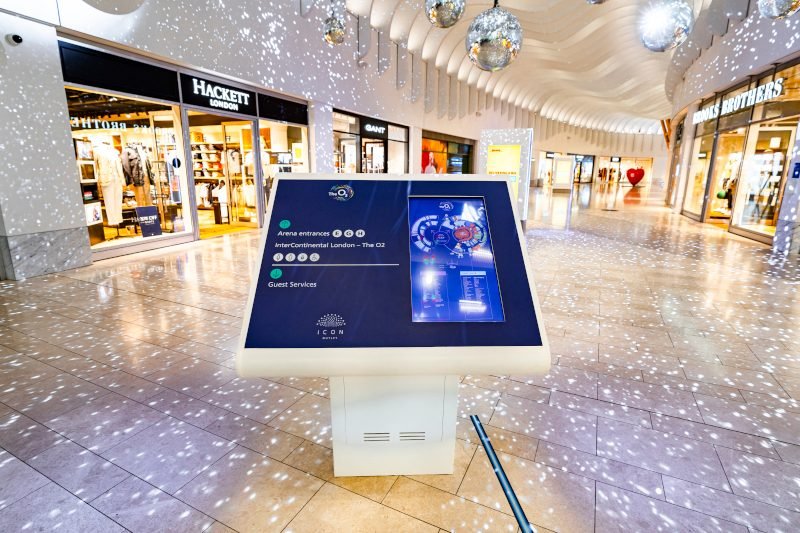
Indoor digital screen kiosks are designed for controlled environments such as shopping malls, retail stores, corporate offices, hospitals, schools, and government service centres. In Southeast Asia and the Middle East, these venues often combine modern architecture with high visitor traffic, making indoor kiosks an ideal way to deliver information and services more efficiently.
A slim, clean enclosure with a high‑definition display fits naturally into premium malls in Singapore, Bangkok, Dubai, or Doha. Indoor kiosks prioritise aesthetics, user experience, and integration with interior design while still offering reliable operation. You can choose different colours, finishes, and branding elements—such as custom lightboxes or printed panels—to match tenant brands or property styles.
Because indoor conditions are relatively stable, these kiosks do not require the extreme brightness or weather protection that outdoor units need. This helps optimise cost while still ensuring sufficient brightness and readability under mall or office lighting. Anti‑fingerprint coatings and durable touch surfaces help keep screens clean and responsive in high‑traffic environments such as hospitals and government offices.
Indoor kiosks are also frequently tied into centralised content management systems, enabling remote updates across multiple locations or even multiple countries. A retail group operating stores across Kuala Lumpur, Jakarta, and Manila, or an F&B brand expanding across the UAE and Saudi Arabia, can synchronise promotions, update menus, and monitor device status from a single platform.
You can browse typical indoor models in our Kiosk product category.
Outdoor Digital Screen Kiosks
Outdoor digital screen kiosks are built to survive harsh environments, particularly relevant in Southeast Asia’s tropical climate and the Middle East’s hot and arid conditions. High temperatures, intense sunlight, heavy rain, humidity, sand, and dust can quickly damage consumer‑grade displays. Outdoor kiosks address these challenges through specialised hardware and enclosure design.
One of the most visible differences is brightness. Outdoor kiosks use high‑brightness displays that remain readable under direct sunlight or strong reflections from nearby surfaces. Anti‑glare or anti‑reflective treatments, combined with high contrast ratios, ensure content is legible at midday in open plazas, bus stops, or petrol stations. This is essential for smart city projects, outdoor advertising, public transport information, and wayfinding.
The enclosure of an outdoor kiosk is weatherproof and often rated to specific IP (Ingress Protection) standards. It protects internal components from rain, humidity, dust, and sand. In coastal cities across Southeast Asia, corrosion resistance is important due to salty air, while in the Middle East, you must design for sandstorms and significant temperature variation between day and night. Advanced thermal management—using optimised airflow, filters, insulation, or active cooling—keeps internal temperatures within safe operating ranges.
Security and vandal resistance are equally important. Outdoor kiosks typically include toughened or laminated glass, reinforced locks, tamper‑resistant access panels, and robust mounting systems that prevent tipping or theft. In busy urban areas, along highways, or around stadiums and large events, these measures protect your investment and reduce maintenance downtime.
To see examples of weatherproof designs, visit our Outdoor Kiosk category.
Touch vs Non‑Touch Digital Screen Kiosks
The decision between touch and non‑touch digital screen kiosks should be driven by your business goals, user journeys, and the environment where the kiosk will operate.
Touch‑enabled kiosks are ideal when you want users to actively navigate information, search for content, or complete specific transactions. In many Southeast Asian and Middle Eastern cities, users are comfortable with smartphones and tablets, so they quickly adapt to touch‑based kiosk interfaces. Typical touch use cases include:
-
Mall wayfinding and tenant search
-
Self‑registration or check‑in at hospitals and clinics
-
Queue management in banks, government service centres, and telco outlets
-
Self‑ordering and payment in quick service restaurants and cafés
These kiosks require robust touch technology such as projected‑capacitive or infrared touch, designed for frequent use, and often protected by durable glass. In humid, dusty, or heavily used environments, good sealing and high‑quality materials keep touch performance stable over time.
Non‑touch digital screen kiosks are best when your primary goal is impact and reach rather than interaction. They act as high‑impact digital posters or menu boards, ideal for:
-
Brand campaigns in mall corridors and atriums
-
Dynamic menu boards in QSRs and food courts
-
Informational screens in hotel lobbies, universities, or mosque complexes
-
Corporate announcements in office towers
In these scenarios, the kiosk continuously plays scheduled content, and users do not need to touch the screen. Non‑touch kiosks are simpler to clean, have fewer components, and can be more cost‑effective, while still delivering a strong visual presence.
In practice, many organisations deploy a mix of touch and non‑touch kiosks within the same property or network. For example, a shopping centre in Kuala Lumpur might use non‑touch digital screen kiosks at entrances to show mall‑wide promotions, while interactive touch kiosks deeper inside the property handle store search and route guidance. A quick service restaurant chain in Dubai may combine non‑touch menu displays above the counter with touch self‑order kiosks beside the queue to serve different customer needs and peak times.
You can explore both interactive and non‑interactive models across our Kiosk range.
Android‑Based vs PC‑Based Digital Screen Kiosks
Digital screen kiosks typically run on one of two main platform types: Android‑based systems or PC‑based systems. Each has its strengths and is suited to different types of projects.
Android‑based kiosks have become extremely popular in Southeast Asia and the Middle East because they offer a cost‑effective, flexible platform for modern applications. They are built around embedded boards or SoC modules that are compact, energy‑efficient, and designed for continuous operation. This makes them ideal for slim, elegant kiosk designs commonly requested in high‑end malls, hotels, and corporate offices.
Advantages of Android‑based digital screen kiosks include:
-
Lower hardware cost and power consumption compared to many PC‑based setups
-
Easier app development and integration with existing Android or mobile solutions
-
Built‑in support for kiosk mode and remote device management
-
Simplified over‑the‑air (OTA) updates across multiple sites and countries
For retail chains across Kuala Lumpur, Bangkok, Manila, and Jakarta, or for F&B brands expanding across the UAE, Saudi Arabia, and Qatar, an Android platform can greatly simplify deployment and ongoing management.
PC‑based kiosks, usually running Windows, Linux, or other specialised systems, remain the right choice for more demanding or legacy‑heavy environments. They are often preferred when you need:
-
Integration with existing Windows‑based enterprise software or databases
-
Complex business logic or heavy applications, such as 3D visualisation
-
Custom device drivers or specialised peripherals
-
High‑end analytics or on‑device processing beyond typical Android use
In some government, banking, or large corporate projects in the Middle East, where critical back‑office systems are already built around Windows, PC‑based kiosks may be the straightforward extension of those systems to public‑facing terminals.
When comparing Android vs PC‑based kiosks, consider not only the upfront hardware and license costs but also the long‑term total cost of ownership. Android devices often win on price, simplicity, and maintenance, while PCs provide maximum flexibility at the cost of more complex security and update management. For many organisations, a hybrid strategy works best—using Android‑based digital screen kiosks for standard signage and interactive tasks, and reserving PC‑based kiosks for specialised or mission‑critical applications.
To learn more about Android kiosk solutions, visit our dedicated page: Android Touch Screen Kiosk Supplier.
Core Components of a Digital Screen Kiosk
A reliable digital screen kiosk is made up of carefully matched components. Neglecting any of them can lead to poor performance, downtime, or a bad user experience. Understanding the main components helps you make informed decisions during planning and procurement.
Display Panel
The display panel is the face of your kiosk, and the primary element users interact with. Its size, brightness, resolution, colour performance, and lifetime have a direct impact on user experience and the perceived quality of your brand.
Typical size ranges include:
-
21.5″–27″: Compact kiosks for counters, corridors, clinics, and small foyers
-
32″–43″: Medium‑size kiosks suitable for most malls, retail, and corporate corridors
-
49″–55″: Large, high‑impact kiosks for open atriums, hotel lobbies, and transport hubs
In bright indoor environments, such as glass‑heavy malls in Singapore or Doha, higher brightness panels are often needed to counter reflections. For outdoor or semi‑outdoor use, high‑brightness panels and advanced coatings are essential for readability under sunlight.
Resolution is typically Full HD (1920×1080) as the baseline for most kiosk sizes. For larger displays or premium environments, 4K can provide extra sharpness, particularly when users stand close to the screen. However, 4K also requires higher‑quality content and more bandwidth, so the decision should balance visual requirements with practical constraints.
Industrial‑grade panels are designed for longer lifetimes and extended operating hours, reducing the risk of early failures or image retention. This is important in regions where kiosks may need to run from early morning until late at night, seven days a week.
You can see real product examples, such as 21.5–27 inch Android and commercial kiosks, in our product listings.
Touch Technology
For interactive kiosks, touch technology determines how responsive and intuitive the experience feels. Poor touch performance leads to frustration, longer interaction time, and lower conversion.
Common touch technologies include:
-
Projected‑capacitive (PCAP):
Provides a smooth, modern experience similar to smartphones and tablets. It supports multi‑touch gestures and works well with flat glass surfaces, making it ideal for premium retail and corporate environments. -
Infrared (IR):
Uses an invisible grid of IR beams across the screen surface. It can support thicker glass and larger screen sizes and is tolerant of certain surface contamination, which can be useful in semi‑outdoor or high‑traffic environments. -
Resistive:
Supports basic touch with pressure but offers less clarity and durability compared to PCAP and IR and is less common in modern commercial kiosks.
In Southeast Asia and the Middle East, where humidity, dust, and frequent cleaning are part of daily operations, the combination of touch type, protective glass, and sealing method must be carefully chosen. Anti‑fingerprint coatings and high‑quality glass not only keep the kiosk looking clean but also reduce glare and improve touch responsiveness over time.
Media Player and Operating System
The media player or embedded PC is the brain of your digital screen kiosk. It runs your kiosk application, connects to the network, and handles content playback and updates. It must be stable, secure, and compatible with your content management system and any integrations you require.
Key considerations include:
-
Platform: Android, Windows, Linux, or proprietary SoC solutions
-
Performance: CPU, RAM, storage capacity appropriate for your application
-
Connectivity: Ethernet, Wi‑Fi, 4G/5G, and support for VPNs or secure tunnels
-
Security: Kiosk mode, automatic recovery on reboot, remote update capabilities
For multi‑country deployments across Southeast Asia and the Middle East, remote manageability is crucial. You should plan for the ability to push app updates, content changes, and configuration adjustments over the network, as well as to monitor device health and status without on‑site visits.
If you need embedded Android panel PCs as part of your kiosk design, explore our Android Industrial Panel PC category.
Enclosure and Mechanical Design
The enclosure protects all internal components while presenting a professional, brand‑aligned appearance. It also determines how easily technicians can access the kiosk for installation and maintenance.
Important design elements include:
-
Materials and finish: metal structures with high‑quality powder coating and tempered glass front panels
-
Access and maintenance: front‑access or rear‑access designs
-
Stability and safety: solid bases and proper anchoring, especially in high‑traffic areas
-
Modularity and scalability: ability to add peripherals or upgrade components later
In both Southeast Asia and the Middle East, mechanical design must also consider housekeeping practices, frequent cleaning, and accessibility requirements for people with disabilities.
You can see different enclosure styles—from floor‑standing to wall‑mounted—across our Custom Mall Kiosk and Touch Kiosk range.
Content Management System (CMS)
A content management system makes it possible to operate one or hundreds of digital screen kiosks without losing control. It allows you to schedule content, push updates, manage devices, and, in many cases,s track basic analytics.
Key features to look for include:
-
Centralised content library and playlist management
-
Support for different layouts, resolutions, and orientations
-
Multi‑site and multi‑region control for large deployments
-
Device status monitoring and alerts for offline or malfunctioning units
-
User access control and workflows for different teams or partners
For organisations operating across multiple countries in Southeast Asia or the GCC, a cloud‑based CMS can simplify operations and ensure content consistency while still allowing local teams to run their own campaigns within defined guidelines.
Key Applications and Industries
Digital screen kiosks are highly versatile and can be adapted to almost any public or semi‑public space. The most successful deployments are tightly aligned with clear business goals in specific industries.
Retail & Shopping Malls
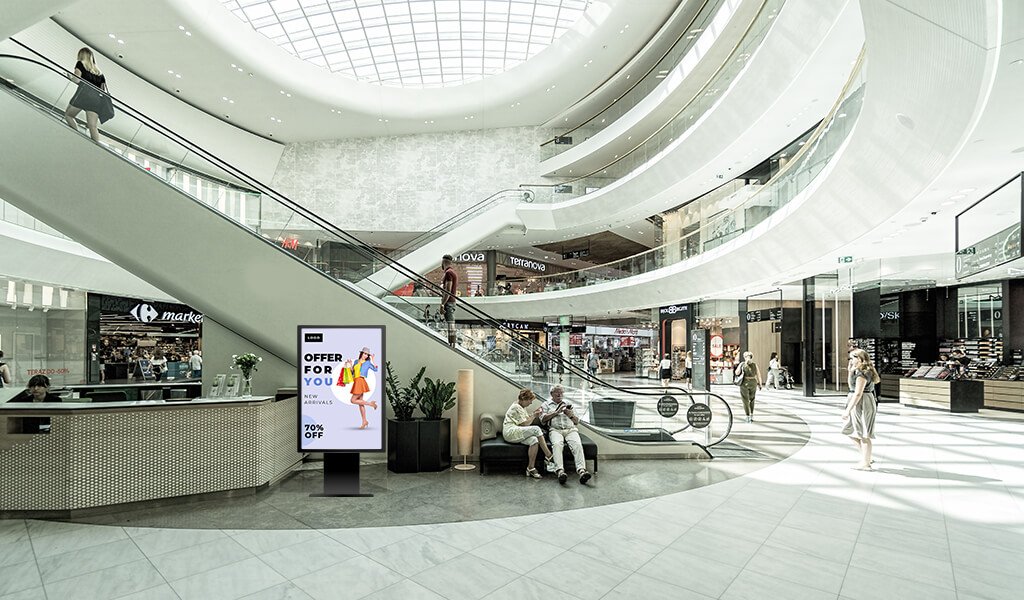
In retail and shopping malls, digital screen kiosks help visitors find stores, check promotions, and explore products without waiting for staff. In large malls across Bangkok, Kuala Lumpur, Manila, Dubai, and Riyadh, kiosks are often placed near entrances, escalators, and central atriums to act as 24/7 digital concierges.
Common applications include:
-
Interactive wayfinding maps with search by category, brand, or floor
-
Tenant directories and promotions linked to specific stores
-
Campaign and event information (sales, festivals, seasonal themes)
-
Digital loyalty program registration or QR code journeys
You can learn more about our mall‑focused kiosk solutions on the Custom Mall Kiosk page.
Quick Service Restaurants (QSR) and F&B
QSRs and other F&B operators increasingly rely on digital screen kiosks to speed up orders and present dynamic, visually appealing menus. In busy food courts and standalone outlets across Southeast Asia and the Middle East, self‑order kiosks help reduce queues and improve order accuracy, while digital menu boards above the counter drive awareness of key items and limited‑time offers.
Use cases include:
-
Self‑order kiosks with dynamic upselling
-
Digital menu boards with dayparting
-
Interactive promotions that change based on time or stock levels
Weather‑resistant models for drive‑thru and outdoor F&B environments can be found under our Outdoor Kiosk category.
Transportation Hubs
Airports, metro stations, bus terminals, and ferry ports rely on digital screen kiosks for real‑time information and self‑service. In international hubs such as Changi Airport, Kuala Lumpur International Airport, Dubai International Airport, and major metro networks in the region, kiosks provide multilingual guidance and up‑to‑date travel information.
Typical implementations include:
-
Real‑time departure and arrival information screens
-
Interactive wayfinding for terminals, gates, and facilities
-
Self‑check‑in or ticketing kiosks
-
Public transport information kiosks integrated into smart city networks
Outdoor and semi‑outdoor transport kiosks generally require high‑brightness and weatherproof designs similar to those in our Outdoor LCD Kiosk solutions.
Healthcare, Corporate, Education, Hospitality and Government
Digital screen kiosks also play important roles in:
-
Hospitals and clinics: Patient check‑in, queue management, wayfinding, and health information content
-
Corporate offices: Visitor registration, meeting room booking, internal communications, and brand storytelling in lobbies
-
Universities and schools: Campus maps, event information, announcements, and student self‑service portals
-
Hotels and resorts: Digital concierge services, wayfinding, meeting room information, and cross‑selling of F&B and spa services
-
Government service centres: Self‑service forms, queue systems, status updates, and information delivery in multiple languages
For a broader view of how digital kiosks support different verticals, see our wholesale display kiosk solutions overview.
Benefits of Using Digital Screen Kiosks
When well implemented, digital screen kiosks deliver measurable benefits that go beyond aesthetics.
Key advantages include:
-
Improved customer experience:
Customers can find information, navigate spaces, and complete tasks at their own pace, without waiting for staff. This is particularly valuable in busy malls, hospitals, and government centres. -
Higher revenue and conversion:
Kiosks can be configured to promote upsells, cross‑sells, and limited‑time offers. In QSR and retail environments, this often leads to higher average ticket values. -
Reduced operational costs:
Self‑service kiosks handle routine queries and transactions, allowing staff to focus on higher‑value tasks or more complex cases. -
Consistent brand and message delivery:
Content and workflows are centrally defined and can be updated instantly, ensuring a consistent brand experience across all your locations in Southeast Asia and the Middle East. -
Data and insights:
Interactive kiosks can capture data on searches, navigation paths, and usage patterns, helping refine store layouts, improve signage, and optimise promotional strategies.
How to Choose the Right Digital Screen Kiosk
Choosing the right digital screen kiosk begins with clarity about your objectives, environment, and constraints.
You can think of the process in several steps:
-
Define your primary use cases
Are you focusing on wayfinding, self‑ordering, check‑in, ticketing, advertising, or a mix of these? -
Analyse your environment
Indoor vs outdoor, lighting conditions, space constraints, and expected traffic all influence your choice of display size, brightness, enclosure design, and protection level. -
Identify your audience and locations
Consider user demographics, languages, accessibility needs, and typical behaviours in your target locations—whether they are malls in Bangkok, hospital corridors in Jakarta, or government centres in Abu Dhabi. -
Select your platform
Decide between Android‑based and PC‑based kiosks, taking into account your existing IT ecosystem, software requirements, and long‑term support capabilities. -
Plan content and CMS
Ensure you have a clear content strategy and a CMS that can handle your required layouts, resolutions, and number of locations. -
Check for scalability and support
Choose hardware and partners that can support scaling up across multiple sites and countries, with reliable service, spare parts, and technical support in your key markets.
To explore digital kiosk options from a single vendor, visit our wholesale digital kiosk display supplier guide.
Example Digital Screen Kiosk Solutions
To make these concepts more concrete, imagine a few typical configurations drawn from our existing product range:
-
Indoor 27‑inch Android touch kiosk
Ideal for hospital check‑in, corporate reception areas, and compact retail spaces in Southeast Asian cities. It offers a small footprint, enough screen space for interactive forms, and energy‑efficient hardware. -
Freestanding 49‑inch mall wayfinding kiosk
Common in large malls in Kuala Lumpur, Manila, Dubai, and Riyadh, combining a large portrait display with interactive maps and promotional content. High‑brightness indoor panels ensure visibility even in bright atriums. -
Outdoor 55‑inch high‑brightness kiosk
Suitable for smart city deployments, transport hubs, or outdoor retail plazas. Weatherproof housing, high nits, and robust cooling enable clear, reliable operation under harsh sunlight and high temperatures.
You can find many of these configurations within our Kiosk and Outdoor Kiosk categories.
Get Started with Your Digital Screen Kiosk Project
Planning a digital screen kiosk project does not have to be overwhelming. Start by outlining your main use cases, target locations, and budget range, then work with an experienced kiosk manufacturer or integrator to translate them into a complete hardware‑software solution. A short consultation can turn a rough idea—such as “interactive mall directory in Bangkok” or “self‑service kiosk network across UAE branches”—into a concrete, actionable specification.
For best results, treat your digital screen kiosk project as a long‑term platform rather than a one‑off installation. Choose components and partners that support upgrades, remote management, and expansion across new sites in Southeast Asia and the Middle East as your business grows. With the right strategy, digital screen kiosks will not only modernise your physical spaces but also become a powerful engine for better customer journeys and stronger business performance.
To discuss a specific project or request a custom proposal, contact us via the form on our homepage or through our wholesale display kiosk supplier page.

 English
  Arabic
  Spanish